|
|
Hi Jason, I reported this issue to Digicap. (https://jira.skbroadband.com/browse/FSTB12-77) I will let you know if any update. Thank you. Kim |
|
|
Hi Jason I'm a little confused. - When the network is disconnected, the popup screen is a native UI screen, it has an app sorting function (blue button). - HomeUI > Games & Apps , the Apps screen is a web menu. app sorting function has never been implemented in the web menu. https://jira.skbroadband.com/browse/FSTB12-77 So the previous ATV10 FW was also approved by Google. Is there any change in this requirement in ATV12? Thank you YK.Jung |
|
|
Hi YK, No change in this requirement. I just want to know how to verify this item If we don't go to the native UI to select the sorting type, what is the default sorting type ? 1. most recently used 2. Alphabet My test steps is as follows, 1. Open the 4th app, 2. Press Home 3. Go to app list, the app I opened (4th) before is still in the 4th position (Fail) 4. Reboot 5. Go to app list, the app I opened (4th) before is still in the 4th position (Fail) 6. Plug out ethernet, Press blue button in Native UI, Select first option (most recently used) 7. Insert ethernet, then Press Home 8. Go to app list, the app I opened (4th) before will go to the 1th position (Pass) 9. Press the 3rd app then Press Home 10. Go to app list, the app I opened before in Step 9 (3rd) will go to the 1th position (Pass) I think the problem is there is no default until we go to the native UI to enable it. I suspect our 3PL didn't check it before in ATV9/10 carefully, maybe their vpn network is not stable, so they test it in NativeUI. Thanks, Jason |
|
|
Hi Jason I translated only the necessary parts of the documents I received from SKB. information about app sorting operating as default is as follows: google_app_list.PNG please check it Thank you YK.Jung google_app_list.PNG (92,282 bytes) |
|
|
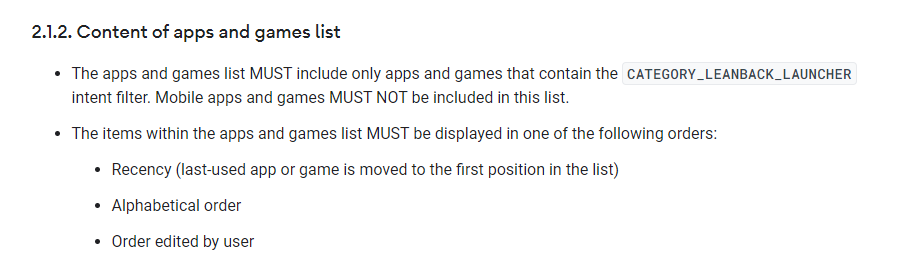
Hi YK, My question is according to the requirement, apps and games list MUST be displayed in one of the following orders Recency (last-used app or game is moved to the first position in the list) Alphabetical order Order edited by user I think SKB already implemented Recency and Alphabetical order. But what is the default type of sorting? In my test, there is no default type until I go to Native UI to config it. The picture you attached is Out-of-Box requirement, but when user start to use app or reboot the device, I think there must be a type as follows, Recency (last-used app or game is moved to the first position in the list) Alphabetical order Order edited by user Thanks, Jason order.png (27,450 bytes) |
|
|
Hi Jason The requirement you are talking about has never been reported by any other manufacturer. To be clear After removing the LAN cable, I set sorting with blue key and captured the game & app list screen after connect LAN cable 1: default 2: 최신사용순 last-used app 3: 가나다 > ABC 순 4: ABC > 가나다 순 When I tested it, sorting function is applied only to "구글 앱:Google app" list at app lists screen Other apps lists are fixed due to AWS regardless of sorting setting ( please check image.png ) at here 1) 구글 앱 : Google app list In the case of the "Google app" list,I think there will be no problem 2) Other apps lists ( TV 게임 list / 키즈 list / 카드&보드게임 list / 라이프 & 엔터 list ) Currently, it is fixed due to AWS. Is Google requirement met if these lists are sorted "Alphabetical order" or "Recency" ? Please let me know if there is anything I misunderstand. Thank you YK.Jung |
|
|
Hi YK, >>The requirement you are talking about has never been reported by any other manufacturer. The requirement (order.png) I attached before is from Custom Launcher Requirements This test items in SmokeTest (c-launcher-spec-check) ask tester to check the Custom Launcher Requirements, Please refer to c-launcher-spec-check.jpg How does other manufacturer verify this item? >>To be clear >>After removing the LAN cable, I set sorting with blue key and captured the game & app list screen after connect LAN cable 1: default 2: 최신사용순 last-used app 3: 가나다 > ABC 순 4: ABC > 가나다 순 I have one question, I tested 15.537.8 + webui (dev + v534) I only see 3 options, Please see the attachments. (sorting_type.png) >> Currently, it is fixed due to AWS. >> Is Google requirement met if these lists are sorted "Alphabetical order" or "Recency" ? We only care about the first row. The first row is app & games lists. the other row is recommended list (not installed in STB) Thanks, Jason sorting_type.png (122,704 bytes) c-launcher-spec-check.jpg (93,098 bytes) |
|
|
Hi Jason I checked, the sorting option was recorded in btv_home/config/tvservice-system-properties.xml when I tested it. <entry key="PROPERTY_APP_AND_GAME_SORT">APP_SORT_DEFAULT</entry> <entry key="PROPERTY_APP_AND_GAME_SORT">APP_SORT_KOR</entry> <entry key="PROPERTY_APP_AND_GAME_SORT">APP_SORT_ENG</entry> <entry key="PROPERTY_APP_AND_GAME_SORT">APP_SORT_LATEST_USED</entry> and the UI allows the user to see below three sort options. 1: 최신사용순 last-used app (APP_SORT_LATEST_USED) 2: 가나다 > ABC 순 (APP_SORT_KOR) 3: ABC > 가나다 순 (APP_SORT_ENG) This is when the user has never used the sort option (initial value) 4 : APP_SORT_DEFAULT That is , there are four options when checked by code, and only three options are displayed in the UI. In the case of INTEK, he is not aware of this content at all. and he didn't know that there was a sorting function. So I told he this information. After a brief check, he is asking me again that there will be no problem if it is always displayed in the order below. 1. Play Store, 2. Play Movies & TV, 3. YouTube, 4. YouTube Music, and 5. Play Games. .. etc on.. That is , INTEK expect that there will be no problem if the sorting option change is not applied to web ui screen. Thank you YK.Jung |
|
|
Hi YK, >>1. Play Store, 2. Play Movies & TV, 3. YouTube, 4. YouTube Music, and 5. Play Games. .. etc on.. This requirement is for out of box, when user start using app, the launcher should also follow the following requirement as below, Recency (last-used app or game is moved to the first position in the list) Alphabetical order Order edited by user Thanks, Jason |
|
|
Hi YK, One thing i think we can try to convince 3PL is the APP_SORT_DEFAULT is out of box value. After user change the sorting type, they can NOT set Back to "APP_SORT_DEFAULT " value. So the sorting type will BE displayed one of following order. Recency (last-used app or game is moved to the first position in the list) Alphabetical order I just discussed it with our engineer who is in charge of other project's customer launcher What he cares about is if there is a place that clearly prompts the user how to modify the sorting type. (the offline/native UI is NOT obvious) How do users know it? Thanks, Jason |
|
|
HI Jason FYI, Looking at webUI dev/534, the app list has changed slightly unlike before Anyway , no other manufacturer has commented on the app sorting. Only FXN is raising this issue. What is the simplest way to solve this issue? ( I don't know what to do ) Should I ask the native UI to make one more menu where user can select APP_SORT_DEFAULT ? Thank you YK.Jung |
|
|
>>Anyway , no other manufacturer has commented on the app sorting. >>Only FXN is raising this issue. Because they didn't check the documents carefully >>What is the simplest way to solve this issue? The currently question is how does user know the sorting function. I think we can try to convince 3PL is the APP_SORT_DEFAULT is out of box value. if user want to sort by Recency or Alphabetical order. They can go to offline mode and press blue button. But, 3PL will ask the following question. How do users know? Did you write it on user guide or web site ? If Digicap is currently unable to fix it, Did SKB mention the method (offline + blue button) on user guide or on Smart3 web site ? Thanks Jason |
|
|
Hi Jason SKB reviewed the customer launcher's specifications and said they don't know where the violation is. ( there is no content to notify the user) and I don't think this will be an critical issue. If it is not a blocking issue, it would be better to skip this situation. (The current UI is almost impossible to modify. ) Thanks YK.Jung |
|
|
Hi YK, >>said they don't know where the violation is. in our opinion The out-of-box MUST be >> APP_SORT_DEFAULT (it's OK) When user start use to app, apps and games list "MUST" be displayed in one of the following orders Recency (last-used app or game is moved to the first position in the list) Alphabetical order Order edited by user if 3PL check carefully, they will ask us, why the sorting type NOT belongs as follows, Recency (last-used app or game is moved to the first position in the list) Alphabetical order Order edited by user At that time, we think we can try to convince 3PL is that the APP_SORT_DEFAULT is out of box value. if user want to sort by Recency or Alphabetical order. They need to go to offline mode and press blue button. But, 3PL will ask the following question. How do users know? Does SKB write it on user guide or web site ? We have been asked similar questions before. if SKB already write it on user guide or web site, we think we can convince 3PL. Thanks, Jason |
|
|
Hi Jason SKB showed me the customer launcher check list screen. There are no items to check for sorting-functions. In other words, the part you are talking about is not on the checklist. Or is the part you request not in the checklist, but does 3PL always check? Did I miss anything? Thanks YK.Jung image-2.png (91,406 bytes) |
|
|
Hi YK, Item 4 Verify that the apps are displayed in recency or alphabetical or user edited order for non out-of-the-box case In other world, after user start using app/reboot device (it will go to non out-of-the-box case) The apps MUST be displayed in 1. recency 2. alphabetical 3. user edited order Thanks, Jason |
|
|
Hi Jason I asked SKB manager to put the information in the User Guide, but SKB manager says it is almost impossible. How about this one? "If a user wants to use the feature, user can hear the description of the feature through the SKB consultation call." Thank you YK.Jung |
|
|
Hi YK, How about this one? "If a user wants to use the feature, user can hear the description of the feature through the SKB consultation call." I will guide 3PL to test this function, if 3PL ask us "how does user know it" I will reply "user can call the SKB support center hotline for consultation." Thanks, Jason |
|
|
Hi YK, Our QA has checked the sorting function on 15.537.16 Sorting behavior is different than before Reproduce steps: 1. Plug out ethernet cable and Go to offline mode 2. Press blue key and choice Recency mode 3. Open an app 4. Press Home 5. Go to app list Previous version (small icon) The application will move to the 1st position Current version (large app icon) The application will move the 6th position. => Looks like the first five app position are fixed. Could you confirm it? Thanks, Jason |
|
|
Hi Jason When I tested it at app list , the webUI fixed the order of the first five apps position regardless of sorting Thanks YK.Jung |
|
|
Hi YK, so the digicap changed the design right? I just need to confirm this. Thanks, Jason |
|
|
Hi all, We've passed ATV12 LR certification, so I close this issue. Thanks, Jason |
- yk.jung ( (ALTech) Younkwang Jung ) developer



.png)

.png)